Tampilkan postingan dengan label Utility. Tampilkan semua postingan

Fungsi tool ini sama seperti salah satu fungsi yang hanya terdapat pada OS WIN 7 yaitu untuk mengganti wallpaper secara otomatis. Sekarang bukan hanya pemakai WIN 7 aja yang bisa mengganti wallpaper secara otomatis, tetapi para pengguna WIN XP, VISTA, atau OS yang lainnya juga bisa mengganti wallpaper secara otomatis dengan menggunakan tool ini. Asik kan??

Yaaahhhhh gw rasa kalian dah paham secara keseluruhan, so gw ga usah ngejelasin lebih lanjut lagi. Pemakaiannya juga mudah sob. Gw yakin kalian dah pasti bisa mengoperasikan tool ini pas pertama kali liat.
Key Features
• Select files from multiple directories and their subdirectories if required
• Multiple resizing options: Full Screen, Best Fit and Worst Fit Examples
• When resizing you can pick the method that gives your pictures the best result (Catmull-Rom and Lanczos supported)
• Alpha blended fade effects for seamless merging of the wallpaper and background. Examples
• Put a decorative frame around the image Examples
• Multi-monitor systems can display the image properly resized on all monitors or display a different image on each monitor
• Put a background image onto the screen before displaying the wallpaper on top of it Examples
• Save you current preferences to a file as a theme to be reloaded later
• Enhance brightness, contrast and gamma correction independently from your monitor settings
• Change wallpaper at user defined intervals or once at startup
• The AWC screen saver shows your wallpapers in all their glory by removing the windows and icons
• Apply various graphic effects when displaying such as invert and emboss
• Use hotkeys to change the desktop on demand
• Automatically check your image directories to see if any new files have been downloaded and add them to the display list
• Ensure that each image in the list is displayed only once, even across Windows sessions
• Virtually unlimited number of images can be displayed
• Use EXIF orientation flag in photographs to automatically rotate images
• Display the file name on the image
• Filter the files to display by age, date and minimum size
• Multiple tiling options Examples
• Image formats supported are BMP, JPG, JPEG, GIF, PNG, PCX, TGA, RLE.

4.7.50 - February 25, 2010
• Filter by image dimensions added
• Filter by orientation added (e.g. portrait only)
• Ampersands in file names now display correctly
• Window focus issues when using tray icon fixed
• Main window is no longer hidden by default when minimised in Windows 7 so it complies with interface standard. Option added to preferences so that this behaviour can be forced.
• Task bar icon handling now Windows 7 compliant
• In File View AWC no longer displays a file not found image when asked to display files that have been deleted from the disk but are still in the file list
• In file view corrected logic when deleting a file in multimonitor mode so that the next file in the list in displayed rather than the first one.
• You can now select Do not show me this message again option on some informational messages. Select Reset Hidden Prompt Message from View menu to turn them back on.
• Updated to FreeImage version 3.1.31 so that recent modifications to EXIF standard are supported
• JPG decoding enhanced for greater clarity
• You can cancel the filtering process by pressing key
• Fixed bug where dragging a shared folder from a remote computer did not add the folder to the list
• When deleting a file in folder mode AWC now selects a random file to replace it rather than always selecting the last file in the list
• Now accepts a theme (.SET) file as a command line argument. This means you can just drag and drop a theme onto your AWC shortcut or set up a simple file association.

Bagi yang mau, donlot aja yaaa....!!!!!

Download File : Click Me!!!


Dari namanya aja kalian dah tau fungsi software ini kan....Yaaa software ini berfungsi untuk melindungi komputer kita secara offline dari ancaman virus melalui Flash Disck So sangat berguna bukan?? Penggunaannya juga mudah sob. Begitu FD tersambung, maka FD tersebut secara otomatis akan di scan oleh tool ini....

Product Highlights:

100% protection against any malicious programs via USB drive

USB Disk Security uses innovative proactive technology to block any threats via USB drive. There are relatively few products available in shops or on the Internet which offer 100% protection against any malicious programs via USB drive. The majority of products are unable even to guarantee 90% protection. USB Disk Security is the world's best software to block threats that can damage your PC or compromise your personal information from USB storage. It supports USB drive, flash disk, secure digital card, thumb drive, pen drive, removable storage, ipod, and more.

The best solution to protect offline computer
Other antivirus software should update signature database regularly, and they cannot effectively protect offline computer that is not connected to the Internet. When new viruses, worms and other malicious attacks strike, traditional signatures are insufficient. Every minute one waits for a virus signature update creates a window of vulnerability that could have devastating consequences. USB Disk Security uses advanced proactive detection techniques, requires no signature updates, and closes the window of vulnerability left open by other reactive, signature-based responses.

The world's fastest and smallest antivirus software
With USB Disk Security, it's not necessary to sacrifice speed for detection and scanning. Compare antivirus software and you'll discover that USB Disk Security is by far one of the smallest applications in the industry. For example, the USB Disk Security installer is just 1 MB. The program utilizes approximately 1 to 7 MB of RAM.

Compatible with all antivirus software
Incompatibility between antivirus programs is an issue. In the vast majority of cases, installing two antivirus programs from different vendors on one machine (for increased protection) is technically impossible, as the two programs will disrupt each other's functioning. However, USB Disk Security is 100% compatible with all security software.

Simple to use
USB Disk Security has been specifically designed to perform effectively regardless of the user's level of computer expertise. Just install and forget it.

Berminat??? Donlot aja langsung !!!

Download File : Click Me!!!


Pernahkah kalian mendonlot file RAR yang ukurannya mencapai 100Mb tapi ketika sudah selesai didonlot, eeehhhh ternyata diproteksi password dan kalian ga tau passwordnya? Pasti keki abis kan????Mau diapain tuh file?dihapus? Jangan dulu sob. Gw juga pernah ngalamin kaya gitu n sekarang gw tau jalan keluarnya. Kalian tinggal menggunakan tool ini untuk merecovery password file RAR tersebut. Cara menggunakannya juga gampang kok. Gw yakin kalian pasti bisa langsung make tool ini pas pertama kali liat..

Wokeh bagi yang berminat, donlot aja yaaaa....

Download File : Click Me!!!


Ada yang tau software apa ini? Ini merupakan software yang memiliki banyak fungsi alias multi fungsi, yaitu repairing, restoring, serta mendiagnosa berbagai macam masalah komputer kalian. Selain itu, tool ini jga berfungsi untuk memodifikasi NTFS Volumes, mencari dan mengembalikan file-file yang terhapus, membuat NTFS Volumes baru, sampai scan hard-drive dari virus. Sebenernya mah masih ada fungsi-fungsi yang laen sob.

You need the Ultimate Boot CD if you want to:
• Run floppy-based diagnostic tools from CDROM drives. More and more PCs are shipped without floppy drives these days, and it is such a royal pain when you need to run diagnostic tools on them.
• Free yourself from the slow loading speed of the floppy drive. Even if you do have a floppy drive, it is still much much faster to run your diagnostic tools from the CDROM drive, rather than wait for the tool to load from the floppy drive.
• Consolidate as many diagnostic tools as possible into one bootable CD. Wouldn’t you like to avoid digging into the dusty box to look for the right floppy disk, but simply run them all from a single CD? Then the Ultimate Boot CD is for you!

Tool versi ini sudah mendukung bootable via FD coy. So kalian yang menggunakan netbook yang seperti kita tau ga ada CD-roomnya, bisa menggunakan tool ini.
Asik kan??Menyelesaikan semua masalah komputer dengan menggunakan satu software..

Bagi yang berminat, donlot aja yaaaa....

Download File :
part1 - part2


Kalian yang menggunakan OS Microsoft Windows ilegal sudah dipastikan ga akan bisa meng-update dari official site. Tapi jangan kawatir sob..Dengan bantuan tool ini, kalian bisa membuat OS Windows kalian yang ilegal menjadi legal alias Genuine. So kalian bisa meng-update OS Ms Windows kalian tanpa harus kawatir sob. Asik kan??

Nah bagi yang berminat, langsung donlot aja yaaaa...!!!

Download File : Click Me!!!


Cyberlink YouCam merupakan tool untuk webcam sob. Fungsinya sama aja kaya webcam max yaitu menampilkan beberapa animasi dalam cam. Dengan menggunakan tool ini, kalian bisa mengambil foto bahkan merekam video dengan menggunakan efek emosi, bingkai, serta animasi yang lainnya.

Lima jenis efek video Cyberlink YouCam:

1. Efek animasi tiga dimensi efek sangat lucu

2. Emosi memiliki pengaruh kreatif sama sekali. Lebih dari 20 benda

3. Lingkup efek ini menambahkan tema untuk foto atau video

4. Model efek distorsi, efek distorsi cermin

5. Alat bantu menggambar membuat video chatting lebih ekspresif, membuat desain Filter efek baik di televisi

1 lagi kelebihan dari tool ini adalah kalian bisa mengupload video yang sudah anda rekam ke youtube. Asik kan???

Wokeh bagi yang berminat n yang dah request, monggo donlot...

Download File n Serial + Patch : Click Me

Or

Download File Here : Click Here
Download serial (link by www.remo-xp.com) : Click Me


WinUtilities Pro merupakan sebuah tool untuk menstabilkan kinerja komputer sob. Fungsinya mah sama seperti Tune-up Utilities, yaitu menghapus registry yang eror, mem-back up registry, menghapus junk file, mengoptimalkan memori, dan sebagainya. Tapi menurut informasi yang saya liat, tool ini lebih bagus kinerjanya sob..Penasaran??Langsung donlot aja yaaaa!!!!

Donlot File : Click Me!!!


Face Off Max merupakan software yang berfungsi untuk mengedit foto sob. Dengan software ini, kalian bisa mengganti body kalian atau body teman kalian dengan berbagai macam body yang terdapat pada software ini. Asik kan??Misal body kalian kurang aduhai kaya gw dan kalian malu untuk menyerahkan foto kalian kepada teman yang baru saja kalian kenal lewat dunia maya. Nah dengan bantuan software ini, kalian bisa mengganti body yang tidak enak diliat tersebut dengan body yang lebih yahud tanpa harus belajar PHOTO SHOP. Tapi tetep aja sob, kalian harus memilih foto yang benar2 sesuai. ga lucu kan kalo wajah kalian item tapi body kalian putih...Sangat terlihat kalo itu palsu dan akibatnya pasti lebih fatal..hehehehe..
Coba liat contohnya dibawah ini!!


Asik kan??
Wokeh bagi yang berminat, silahkan donlot !!!!

Donlot File : Click Me!!!


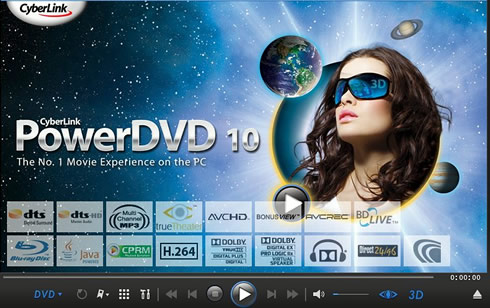
Dah tau fungsi software ini kan? Yup ni tool buat ngejalanin DVD coy. Gw ga akan bicara banyak mengenai software ini coz kinerja n fungsinya udah mendunia...hehehehe

What's New in CyberLink PowerDVD 10
Video :
  • New! - Convert DVD video to 3D using TrueTheater™ 3D.**
  • New! - MKV (H.264) file playback.
  • New! - FLV (H.264) file playback.
  • New! - RM/RMVB file playback (Available when RealPlayer is installed).
  • New! - TrueTheater™ Noise Reduction – removes original video noise during playback.
  • New! - TrueTheater™ Stabilizer – fixes shaky video during playback.
  • More...

Audio :
  • New! - HDMI Audio - High bitrate lossless pass-through support.
  • Dolby Digital Plus.*
  • Dolby TrueHD.*
  • Dolby Digital 5.1.
  • Dolby Digital EX.**
  • Dolby Pro Logic IIx.**
  • Dolby Headphone.**
  • Dolby Virtual Speaker.**
  • DTS-HD Master Audio.*
  • DTS.**
  • DTS 96/24.**
  • AAC Channel support.**
  • TrueTheater™ - Surround (Multi-channel Environment Impression Mode).
  • TrueTheater™ - Surround (Virtual Speaker Mode).
  • TrueTheater™ - Surround (Headphone Mode).
  • Pitch scaling technology.
  • Audio equalizer presets.
  • Audio visualizations.
  • Direct 96/24 output.

Wokeh buat yang berminat n dah request, monggo donlot!!!

Donlot File : Click Me!!!

Password 4shared : www.remo-xp.com

Link by : www.remo-xp.com


Kalo Adobe Photoshop fungsinya buat ngorek-ngorek gambar, ni gw kasih software buat ngorek-ngorek video namanya Adobe Premier. Berhubung gw ga seneng ngoprek-ngoprek video, jadi gw ga bisa share lebih lanjut tentang software ini sob.
Tapi tenang aja...Gw dah dapet informasi tentang Adobe Premier Pro CS4 dari sumber terpercaya...hehehehehehe

Capture, edit, and deliver video online, on air, on disc, or on device! Make every phase of video production more efficient with Adobe® Premiere® Pro software, which includes Adobe OnLocation™ and Adobe Encore®. Adobe Premiere Pro CS4 ships with Adobe OnLocation CS4 for direct-to-disk capture, as well as Adobe Encore CS4 for high-quality DVD and Blu-ray production. Edit files from the latest tapeless formats, including AVCHD, P2, XDCAM EX and HD, natively, without transcoding or rewrapping. Find sections of content quickly during editing simply by skimming the text rather than scrubbing through video with Speech Search technology. Adobe® Premiere® Pro CS4 software improves every major part of the video production process. Numerous editing enhancements, a new tapeless workflow, and innovative metadata features help make editing faster and more efficient. Background batch encoding speeds up delivery to new formats.


Real-time editing for HD, SD, and DV! Make every frame count with Adobe® Premiere® Pro software, the essential tool for professional video editing. Capture and edit virtually any format, from DV to uncompressed HD, and output to tape, DVD, and the web. Providing unparalleled integration with other Adobe applications, Adobe Premiere Pro sets new standards for efficient digital filmmaking.

Save time with tools that take you from on-set capture through to output, and edit virtually any format from DV to HD and beyond. Tight integration with Adobe After Effects and Photoshop software expands your creative options. Reach a wide audience by delivering your content to DVD, Blu-ray Disc, the web, and mobile devices. Available on Intel based Mac and Windows systems, Adobe Premiere Pro is your choice for inventive storytelling and enhanced productivity.

Adobe Premiere Pro, formerly known as Adobe Premiere, is a real-time, timeline based video editing software application. It is part of the Adobe Creative Suite, a suite of graphic design, video editing, and web development applications made by Adobe Systems. Premiere Pro has many h

Here are some key features of "Adobe Premiere Pro CS4":

End-to-end metadata workflow:
· Easily add metadata to clips both on set with Adobe OnLocation software and while editing using Adobe Premiere Pro, for greater project intelligence. Use speech recognition technology to create text-based metadata to help you organize your assets more efficiently. Pass the metadata through export for web publishing, enabling searchable video and helping to unlock new revenue streams.

Speech Search:
· Turn spoken dialogue into text-based, timecode-accurate, searchable metadata. Jump to a specific area of a shot by searching for keywords within the dialogue, and then use keywords to quickly locate and display what you're looking for — or even cut video based on the script

Batch encoding in the background:
· Save time with Adobe Media Encoder, a separate included software application that automates the process of creating multiple encoded versions of your source files and sequences. Manage priorities and control advanced settings for individual files.

Redesigned Adobe OnLocation CS4:
· Get critical monitoring information while you record directly to disk with Adobe OnLocation CS4, now cross-platform with a new Adobe-standard interface. Save time and take the tedium out of logging with shot lists and metadata-based project intelligence.

Editing efficiency:
· Take advantage of more than 50 of the most requested editing enhancements to make your workflow more efficient. Apply effects to multiple selections, get timecode information faster, speed work in the timeline with new keyboard shortcuts, and more

Tapeless camera support:
· Edit video natively in the latest tapeless formats, including RED, AVCHD, P2, XDCAM EX, and XDCAM HD, without transcoding or rewrapping. Browse your drives and removable media from inside Adobe Premiere Pro to find, log, and import footage.

Industry-leading Blu-ray Disc authoring:
· Maintain the pristine quality of your HD video all the way to distribution. Create high-definition Blu-ray discs with Encore CS4, working with the same interface used to create standard-definition DVDs and incorporating advanced Blu-ray features like pop-up menus and subtitles and dual-layer burning.

Faster, customizable SWF output:
· Create SWF file versions of your DVD and Blu-ray projects for the web, complete with DVD interactivity, menus, URL links, and customizable HTML templates, without opening another application. Export for streaming or progressive download, and reduce encode time by using optimized encode settings in Adobe Media Encoder.

Dynamic workflow with other Adobe tools:
· Achieve a high level of productivity from production to delivery with the tightly integrated toolset in Adobe Premiere Pro. Eliminate intermediate rendering when moving sequences into Adobe Encore software, and take advantage of new support for Adobe Photoshop files with video and blend modes.

Faster, customizable SWF output:
· Create SWF file versions of your DVD and Blu-ray projects for the web, complete with DVD interactivity, menus, URL links, and customizable HTML templates, without opening another application. Export for streaming or progressive download, and reduce encode time by using optimized encode settings in Adobe Media Encoder.

Final Cut Pro project import:
· Take advantage of the benefits of the Adobe workflow to finish your Final Cut Pro project, moving content to Adobe After Effects® software, using Speech Search to create searchable video, and exporting through Encore to Blu-ray, DVD, and the web. Use Final Cut Pro XML interchange to transfer projects directly from Final Cut Pro to Adobe Premiere Pro without conversion or rerendering, preserving commonly used effects and transitions.

Requirements:

· 2GHz or faster processor for DV; 3.4GHz for HDV; dual 2.8GHz for HD
· 2GB of RAM
· 10GB of available hard-disk space for installation; additional free space required during installation (cannot install on flash-based storage devices)
· 1,280x900 display with OpenGL 2.0–compatible graphics card
· Dedicated 7200 RPM hard drive for DV and HDV editing; striped disk array storage (RAID 0) for HD; SCSI disk subsystem preferred
· For SD/HD workflows, an Adobe-certified card for capture and export to tape
· OHCI-compatible IEEE 1394 port for DV and HDV capture, export to tape, and transmit to DV device
· DVD-ROM drive (DVD+-R burner required for DVD creation)
· Blu-ray burner required for Blu-ray disc creation
· Microsoft Windows Driver Model– or ASIO-compatible sound card
· QuickTime 7.4.5 software required to use QuickTime features
· Broadband Internet connection required for online services


Wokeh buat yang minat n yang dah request,,langsung donlot aja yaaa...

Donlot File :
part1 - part2 - part3 - part4 - part5 - part6

Atau bisa donlot di sini :
part 1 | part 2 | part 3 | part 4 | part 5 | part 6


Note :
Gw belon donlot nih software...Jadi gw ga tau di dalamnya sudah ada SN/Crack or belon..
Buat jaga-jaga barang kali ga ada, mendingan temen-temen donlot Craagle juga. Tu software kusus buat nyari SN n Crack. Informasi n software Craagle bisa didapatkan di sini.


Ternyata ga cuma mahluk hidup saja yang butuh dokter..Komputer kita juga butuh dokter sob kalo lagi penyakitan alias bermasalah. Ni dia sob software yang berperan sebagai dokter buat PC kita.
Sebenernya mah fungsinya sama aja kaya Tune-up Utilities, yaitu menstabilkan kinerja komputer sob. Untuk lebih jelasnya mengenai fungsi software ini, gw share buat kalian yang gw dapet langsung dari situs resminya..


Speed up your system and internet access by 100%
By tuning-up your Windows, Windows Doctor can significantly boost your system and internet speed.

Optimize your system and improve efficiency
Windows Doctor provides an all-around optimization of your system so that the overall PC performance can be highly improved.

Clean historic traces to protect your privacies
No more worries about your privacies being disclosed. Windows Doctor is able to clean all the traces you left on a computer.

Fix dozens kinds of PC errors to make your computer run smoothly
Most PC errors are caused by invalid registry entries. By cleaning and optimizing your Windows registry, Windows Doctor can make your PC error free.

Clean up all the junks in your system and free valuable disk space
Junk files and Windows temp files can occupy a large portion of hard drive space and affect computer performance. Windows Doctor can quickly detect and wipe away all the junks on your computer.

Easy recovery of lost or deleted data
Accidentally deleted an important file permanently? Windows Doctor can find it back! The new data recovery feature in Windows Doctor can easily locate your lost or deleted files and help you get them back. It’s FREE!

More FREE but useful tools to help you manage your system and files.
In addition to Disk Cleaner and Data Recovery, Windows Doctor now provides more free but very useful tools as a thank you for your support, including Disk Analyzer, File Shredder, File Copy, File Splitter, Memory Defrag, Registry Defrag, and Auto Shutdown.

Absolutely safe
Windows Doctor is 100% safe with no spyware or adware. Having been comprehensively tested in the environments of Windows 7, Vista, XP, 2003, 2000, Windows Doctor is safe to run in above Windows systems.

Buat yang tertarik, silahkan donlot...!!

Donlot File : Click Me!!!

Link by : http://asis-sugianto.blogspot.com


Webcam Max merupakan software buat kamera sob..Dengan menggunakan ini, kalian akan mendapatkan efek kamera untuk gambar serta video yang sangat yahud. Selain itu, kalian juga bisa menggunakan tool ini untuk chat jugaa. So web cam-an kalian akan menjadi lebih seru n berwarna sob..

Features:
* For all webcam programs, ICQ, AIM, MSN, Cam
Frog, Skype, Paltalk, Yahoo Messenger etc. * More than 1,000 effects at webcammax[dot]com, including Mosaic, TV wall, Movie scene, Water, Smog, Emboss, Emotions and etc * Floating text over video. * Switching dynamically between multiple live and stored sources (videos, movies, pictures, or real time desktop). * Effects DIY. * Sharing single webcam by multiple programs at the same time. * Becoming fashionable, sexy, cute, romantic or bewitched, or even horrible. * Taking photos with whatever background you like and whenever you want.

Berminat??Donlot aja coooyyy..

Donlot File : Click Me!!!


Aegisub merupakan Software untuk mebuat subtitle Film dan karaoke sob. Berhubung gw belon pernah make ni software, jadi gw ga bisa share tutorialnya. Tapi buat temen2 yang mau tau secara lengkap, bisa klik di sini. (Tutorial berbentuk video)

Wokeh buat temen2 yang mau kususnya Mr. Momo yang dah request, silahkan didonlot !!!

Donlot File :
Click Me!!!


Sebelumnya gw dah share software untuk belajar Hiragana - Katakana bernama Hikaro. Buat temen-temen yang belon tau apa itu Hikaro, klik di sini. Pada kesempatan kali ini gw bakal share tentang software yang dapat membantu temen2 buat belajar kanji, yaitu WAKAN. Dengan menggunakan software ini, kalian bisa mencari cara baca, huruf kanji, sekaligus mengetahui artinya versi bahasa inggris. Mantabh n asik kan? So kalian jd ga usah beli kamus kanji yang mahal apa lagi beli kamus bajakan alias Foto Copyan dari seseorang (pengalaman pribadi yang sangat menyakitkan).

Oke deh, yuk kita lihat fiturnya.

1. Mulai dari halaman depannya, kita akan diperlihatkan serentetan kanji yang jumlahnya sampai 6335, padahal untuk kehidupan sehari-hari orang Jepang saja sudah pusing dengan 2000 kanji tapi ini disatukan dengan kanji Cina yang memang disupport juga oleh software ini, karena dari artinya saja 和(wa)漢(kan) yang artinya Jepang-Cina.

2. Yang paling penting itu fungsi dictionary nya, dan ternyata wakan ini bisa two way dictionary alias bisa Japanese-English dan English-Japanese!! Ada juga contoh kalimatnya dibawah, tapi untuk fungsi kalimat ada file khusus lagi yang harus didownload di sini.

3. Setiap kita mengarahkan kursor ke salah satu kanji, maka akan muncul penjelasan kanji tersebut (kunyomi, onyomi, dll) tanpa harus mengkliknya.
4. Kita bisa juga membuat kalimat dengan hiragana kecil diatas kanji (furigana) sebagai cara bacanya.

4. Gambar di bawah adalah detail setiap kanji yang kita klik. Sangat lengkap!!! Ada cara baca mandarin dan tingkat JLPT untuk kanji yang bersangkutan. Untuk huruf yang tidak muncul itu(yang kotak), merupakan contoh komputer yang lemot dan tidak diinstall windows japanese fontpack (gambar1). Untuk memunculkannya memang harus diinstal, tapi kalau hanya mau membuat karakter Jepang bisa menggunakan software NJS.
Gimanaaaa????????? mantabh kannnnnnn!!!!!!!
Tunggu apa lagi, donlot sekaranggg !!!!!!!!!!!!!!!!

Donlot File : Click Me!!!


Kaijin Dictionary merupakan kamus Jepang - Indonesia yang menurut gw sangat berguna bagi kalian pemula pembelajar bahasa Jepang. Emang seh ga selengkap kamus GOROTANIGUCHI, tapi lumayan lah buat mengetahui kosa kata yang sering dijumpai atau diucapkan oleh orang Jepang.
Berminat?? Silahkan donlot!!!

Donlot File : Click Me!!!


Mnemosyne merupakan tool yang berfungsi untuk membantu kita dalam mengingat kosakata bahasa Jepang sob. Dengan menggunakan tool ini, kalian bisa mengingat dan menjumpai kosa kata yang sudah kalian tulis setiap hari. Jadi kemungkinan kalian mengingat kosa kata tersebut sangat besar.


Fitur Mnemoysyne :
1. Menambahkan pertanyaan
Tool ini tersedia untuk Linux, Windows, dan mungkin sistem operasi lain juga. Inilah antarmuka utamanya:Program ini bekerja dengan unit pertanyaan dan jawaban yang disebut “kartu”. Untuk menambah kartu baru, gunakan menu DeckAdd cards, tombol penambahan di layar utama, atau dengan menekan Ctrl+A.
Dari jendela “Add cards”, kamu tinggal menuliskan Category (kategori), Question (pertanyaan), dan Answer (jawaban). Kegunaan kategori adalah untuk pengorganisasian: kita bisa dengan mudah mematikan suatu kategori maupun mengaktifkannya kembali. Sebagai contoh, kita bisa membuat kartu baru dengan kategori “Bahasa Jepang” beserta pasangan pertanyaan (P) dan jawaban (J).

Setelahnya, klik saja salah satu tombol yang sesuai dengan tingkatan ingatan kamu terhadap kartu tersebut. Untuk kata-kata baru, saya biasanya menggunakan tingkat 2 (“Kamu telah hafal hal ini, dan mungkin masih bisa ingat untuk beberapa hari ke depan”). Angka yang lebih besar berarti ingatan kamu semakin kuat untuk hal tersebut. Istirahatkan mouse kamu di angka-angka lainnya untuk memunculkan tooltip deskripsinya.

Kalau kamu memilih 2 atau angka yang lebih tinggi, kartu tersebut tidak akan ditanya untuk hari ini. Saat ada kartu yang perlu diulas, kartu tersebut akan muncul di layar utama saat programnya dijalankan.

Selanjutnya Mnemosyne yang akan menjadwalkan kapan kamu akan ditanya kartu-kartu tersebut. Jadi idealnya kamu menjalankan Mnemosyne tiap hari di waktu luangmu untuk mencek apakah ada kartu yang harus kamu jawab. Kalau ada, maka layar depannya akan menunjukkannya seperti berikut:


Kartu yang sedang diulas pertama hanya akan menampilkan pertanyaannya sedangkan jawabannya disembunyikan. Pada waktu itu, kamu harus memikirkan jawabannya. Kalau kamu telah mendapatkan jawabannya atau kalau memang lupa, baru klik tombol Show answer.Mnemosyne memungkinkan kita untuk mengubah kartu-kartu yang telah ada. Tinggal pilih saja menu DeckEdit current card saat kartunya ditampilkan di layar utama.
Nah, jadi bagi yang belum bisa membaca tulisan Jepang silahkan saja buat kartu-kartu yang menggunakan romaji seperti yang sebelumnya.

Nanti kalau kamu sudah bisa membaca hiragana dan katakana, mulailah menggunakannya untuk kata-kata baru. Install IME agar bisa memasukkan tulisan Jepang ke Mnemosyne. Kartu-kartu lama yang masih menggunakan romaji bisa kamu ubah satu persatu saat menemuinya. Contohnya, kartu sebelumnya bisa kamu ubah menjadi seperti berikut nantinya:

P: はは
J: Ibu

Gampang kan ??

2. Mengingat Kanji

Untuk lebih lanjutnya lagi, kalau kamu sudah mulai bisa membaca kanji maka gunakanlah kanji untuk kata-kata baru yang kebetulan kanjinya sudah kamu pelajari. Kartu-kartu lama juga bisa kamu ubah sedikit demi sedikit, misalnya menjadi seperti berikut:

P: 水曜日
J: すいようび (hari rabu)

Ya, jika menggunakan kanji kali ini bagian jawaban berisi cara membacanya sekaligus artinya. Tentu kamu harus menjawab keduanya dengan benar.

(Sumber : http://www.yumeko.web.id/2009/01/20/mnemosyne-alat-bantu-menghafal-sebagai-pendamping-vital-belajar-bahasa-jepang/)

Gw tekanin sekali lagi, software ini hanya untuk mengingat kanji yang sudah kamu pelajrin n ketahui.

Jadi pada intinya, mulailah menggunakan Mnemosyne sedini mungkin. Kalaupun pada awalnya masih menggunakan romaji, kamu belakangan bisa secara bertahap mengubah kartu-kartunya menjadi kana dan pada akhirnya kanji.

Berminat ?? Silahkan donlot..!!!

Donlot File : Click Me!!!